
Even in the times of cheap terabytes a final truth remains: Sooner or later every hard disk will near capacity. But there is help! TreeSize Free tells you where precious disk space has gone. Use the treemap to keep an eye on your disk space.
Screenshots
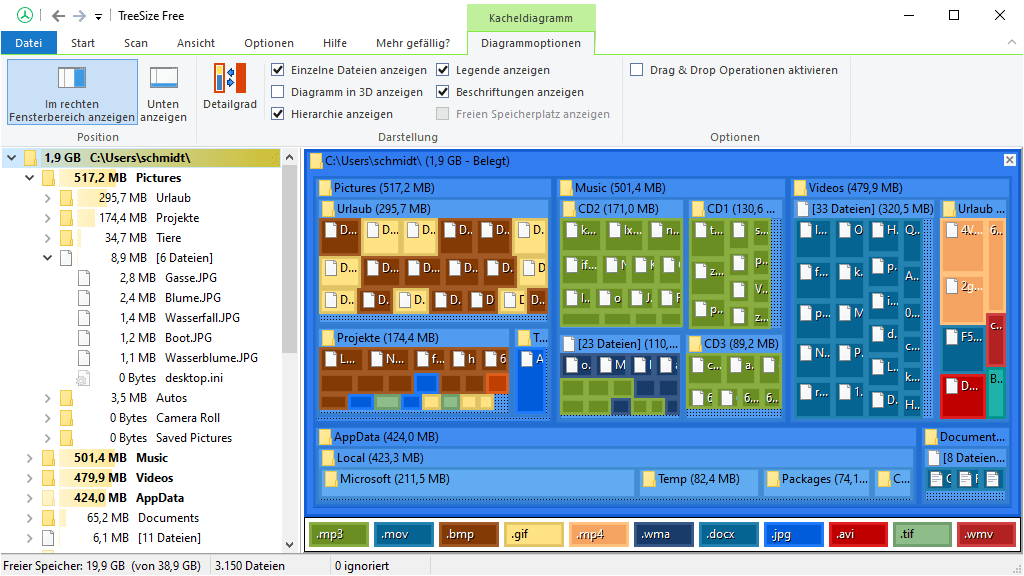

The freeware can be started from the context menu of a folder or drive and shows you the size of this folder, including its subfolders in an Explorer-like fashion. Large folders can be identified at a glance thanks to the gradient bar displayed in the background. All scan results can be drilled down to file level and filters, e.g. for files of a certain type, can be applied.
The column view presents more detailed information for each file and folder. Here you will find the size or number of files as well as the last access date and the owner (and other useful facts).
On touchscreen devices (Windows 8 and higher) you can switch to the intuitive touch interface for even easier navigation.
Scan results can be broken down with the flexible filter feature. You can use the filters, for example, to find files of a certain type, such as temporary files, text files or images and use this information to clean up your hard disks.
TreeSize Free works on the MFT (Master File Table) and reaches extremely high scan speeds. Scanning operations run in a thread, so you will see results almost instantly while TreeSize Free is working in the background. The Explorer context menu and drag & drop operations are supported within the application.
TreeSize Free can display the NTFS compression rate and apply the NTFS compression to directory branches.